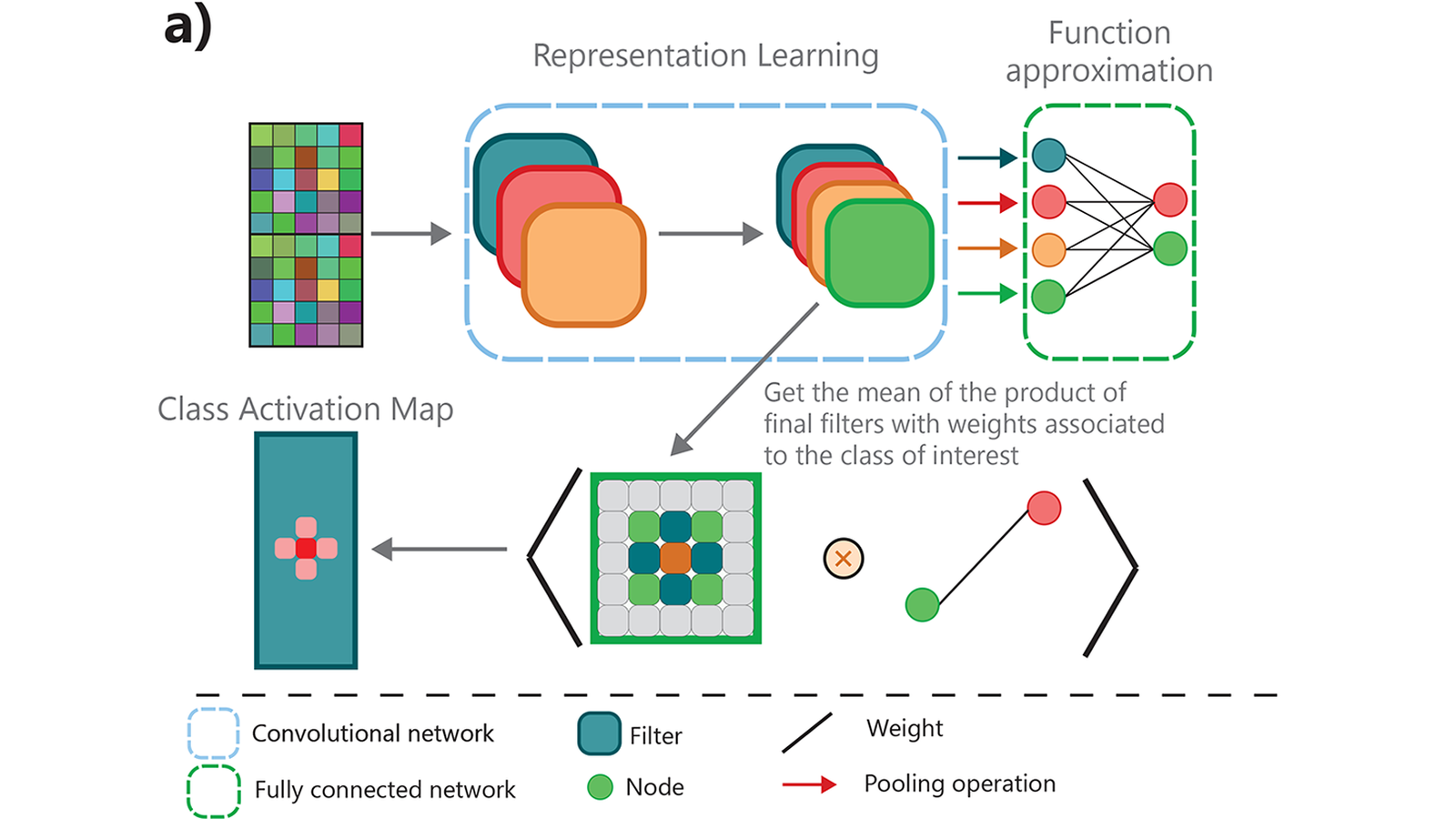
一張熱圖把影像某區塊塗紅,可以是在呈現「這個類別分數和哪些空間位置的特徵活動有關」。另一張看起來像花紋的圖,卻可能是把模型固定後,反覆調整輸入,找出能強烈刺激某個通道的圖樣。
前者是在解釋指定輸入,後者是在搜尋偏好的刺激。兩者都能幫助理解網路,卻不是同一種證據。也不能因為一張圖亮在物體上,就推論模型已完整找到物體邊界,或亮區內每個像素都有因果上的正向作用。
上一篇介紹遮擋、輸入梯度、IG 與 LRP。本篇沿著空間特徵圖往下走:先拆 CAM,再看 Grad-CAM 如何用梯度取得通道權重,最後把「解釋一張圖」切換成 feature visualization 的輸入最佳化問題。完整程式會真的用 CPU autograd 與梯度上升核對小例,但沒有下載 CNN、照片或模型權重。
先分清層、通道、位置與神經元
一層卷積輸出通常同時有空間與通道維度。若以 K×H×W 表示,K 是通道數,H/W 是該層特徵圖的空間大小;它們不必等於原始影像的高與寬。
這個區分會影響問題怎麼問。CAM/Grad-CAM 通常在某個有空間結構的層,把多個通道合成一張位置圖;feature visualization 則可以選擇提高某個神經元、整個通道或某個類別的分數。
通道本身也沒有「天生等於眼睛/輪胎」的標籤。它是學到的一組活動,可能對多種圖樣有反應。幫通道取一個人類容易理解的名稱,是觀察後提出的解讀,仍要檢查其他輸入與反例。
CAM:利用 GAP 與線性類別權重,把分數接回空間
經典 CAM 的方便之處,來自特定結構:空間特徵圖經 global average pooling,再接線性類別分類頭。如果類別 c 對第 k 個 pooled feature 的權重已經知道,就能用同一組權重組合各個空間位置。
圖 2 原字句用 mean 描述特徵圖合成;本篇的精確 CAM 定義在通道方向採加總,GAP 則是在每個通道的空間方向取均值。通道數 K 與空間位置數 Z 不是同一個平均對象。
令 Z=H×W。本篇明定 GAP 取空間均值,類別分數是 softmax 之前的 logit:
F_k = (1/Z) × sum_(i,j) A^k_(i,j)
y_c = b_c + sum_k w^c_k F_k

CAM_c(i,j) = sum_k w^c_k A^k_(i,j)
因此 y_c = b_c + mean_(i,j)[CAM_c(i,j)]
這是 signed map:某位置可能有正項,也可能有負項。bias 是額外的常數,不在空間圖裡。
Zhou 等人的原 CAM 論文在方法敘述中稱 GAP,寫出的 F_k 式子則省略了平均的常數,使用空間和,並把分類頭 bias 設為0;其分數等式也相應採空間和。本篇既然明定 mean-GAP 並保留 bias,就要用上面的均值關係,不能把兩種 convention 的分數直接混用。原 CAM §2/Eq.1–2可對照。
若原模型沒有這種 head,不能把最後幾層硬換成 GAP/線性層之後,還宣稱是在不變的原模型上讀同一個分數。改架構與可能的重訓,必須另外交代。
兩張 2×2 特徵圖,就能核對 CAM 的數字
本篇直接手設兩個中間通道,不經過影像或 CNN:
A1 = [[1,2],       A2 = [[0,1],
      [0,1]]             [3,2]]

F1=1,F2=1.5
類別權重 w=(2,−1),bias=.5
logit = 2×1 −1×1.5 +.5 = 1
逐位置加權得到:
CAM = 2A1 − A2
    = [[2,3],
       [−3,0]]

mean(CAM) = (2+3−3+0)/4 = .5
mean(CAM)+bias = 1
第二通道的活動雖然全部非負,但該類別的線性權重為負,所以它的活動會降低這個 head 的 logit。不能只看 activation 大,就把它當成對任意類別的正向支持。
這仍然是在中間層做的分解。輸入影像的某個像素會透過許多通道、感受野與非線性影響這些活動;「通道在此 head 的權重為正」不等於「增加某個原始像素值必定提高類別分數」,更不是現實世界的因果斷言。
Grad-CAM:對選定分數求梯度,再平均成通道權重
Grad-CAM 不要求模型一定是上述 GAP+線性 head,但需要能取得選定輸出對空間特徵圖的梯度。它先固定目標分數 y_c,再在所選層計算:
alpha^c_k = (1/Z) × sum_(i,j) ∂y_c/∂A^k_(i,j)
L_before_ReLU(i,j) = sum_k alpha^c_k × A^k_(i,j)
L_GradCAM = ReLU(L_before_ReLU)
這裡微分的對象是中間特徵圖 A,不是原始輸入像素 x。原方法以 softmax 前的類別分數計算;若改成機率或其他目標,得到的梯度與圖也可能改變。不能先對最高類別算圖,再把它當成所有類別共用的「模型注意力」。
回到同一個 mean-GAP 線性 head。對任意位置:
∂y_c/∂A^k_(i,j) = w^c_k/Z
alpha^c_k = (1/Z) × Z × (w^c_k/Z) = w^c_k/Z
Z=4,所以 alpha=(.5,−.25),不是 (2,−1)。程式以實際 autograd 求得每格梯度,再平均成 alpha;另用獨立純量 head 做中央差分核對,最大差約9.46×10⁻¹²。
Grad-CAM的ReLU前圖 = [[.5,.75],
                     [−.75,0]]
                   = CAM/4
這個線性特例裡,Grad-CAM 的 ReLU 前圖只差一個正常數。原 Grad-CAM 論文 §3.1 也明說這種比例能在視覺化正規化時被消掉;但不能把它寫成所有模型的 raw alpha 都等於 CAM 類別權重。後面若接非線性 head,梯度還會依當下活動與所選目標而變。
ReLU、bias 與色階:看起來相同,不代表分數相同
標準 Grad-CAM 的 ReLU 只保留組合後的正向部分。本例變成:
Grad-CAM ReLU後 = [[.5,.75],
                  [0,0]]
原本的負項 −.75 不見了。ReLU 前的圖能在這個特例下用 sum(map)+bias 得回 logit1;ReLU 後再照樣加,卻得到1.75。這不是另一個分類機率,也不能靠加總亮區就說恢復了原模型分數。
若為比較顯示方式,把 CAM 也取正部,再各除以自己的最大值,兩張正規化圖都會是:
[[2/3,1],
 [0,0]]
這一步只展示視覺化可能掩蓋常數縮放;不是說原 CAM 的 signed 定義必須先取 ReLU。逐圖正規化也會把很小的最大值放大到1,因此不能只比兩張圖誰更紅,就推論哪一張輸入讓模型更有信心。
bias 同樣不在圖裡。程式把 bias 從 .5 改成2.5,logit便從1變成3,但通道梯度與圖不變。因此,空間圖不能單獨承擔全部分數資訊。
最後還有解析度:本例特徵層只有2×2。把它插值放大,能讓圖覆蓋到原影像大小,卻不會憑空增加細節。實際 CNN 的感受野可能重疊,空間對齊也受層、padding、stride 等設定影響;熱圖不是像素級分割標籤,更不能把邊界畫得平滑當成定位已驗證。
Feature visualization:固定網路,改的是輸入
CAM/Grad-CAM 針對指定輸入與輸出形成位置圖。Feature visualization 的 activation maximization 則反過來問:什麼輸入能讓選定的神經元、通道或輸出有高活動?
固定模型後,可以對輸入 u 做梯度上升:
目標 J(u) = 選定活動 a(u) − prior/regularizer
u_next = u + learning_rate × ∂J/∂u
選單一位置的神經元、整個通道的平均活動、類別 logit 或 softmax 機率,是不同目標。最大化某類機率也可能透過壓低其他類達成,不能把「機率升高」直接等同「更完整地畫出了目標物體」。
為了看清「真的有改輸入」的算式,本篇另設一個三維線性 feature,而不冒充影像網路:
固定 v=(2,−1,.5),輸入u起始為(0,0,0)
a(u) = v·u
J(u) = v·u − lambda/2 × ||u||²
梯度 = v − lambda×u
每次更新 u_next = u + .2×gradient
程式真的執行20次輸入梯度上升更新,梯度由 autograd 計算,固定的 v 沒有被訓練。當 lambda=0,非零線性目標在無限制的 R³ 上沒有有限最大值;20次後 u 約為 (8,−4,2),活動約21。它可以繼續往上,不會自動停在一張「自然影像」。
當 lambda=.5,有唯一解析最大點 u*=v/lambda=(4,−2,1),J*=5.25。實跑20次後,u 約為 (3.51369338,−1.75684669,.87842335),活動約9.22344513,L2項約4.05104476,J約5.17240036,尚未到解析最大值。
這個特例的遞推是 u_n=(1−.9^n)u*,程式另以 Fraction 精確參照核對浮點迭代。這不是對真實 CNN 目標的全局收斂保證:我們刻意選了簡單的凹二次目標。u 也不是 RGB、沒有被限在0到1;這裡的 L2 項只是小例的 prior,不代表學到了自然影像分布。
一個通道可能有多種刺激,prior 也會改變你看到的樣子
一張最佳化圖可能讓人太快替神經元命名。來源研究因此加入 diversity 目標,同時讓多個高活動的輸入彼此有所不同,而不只重複同一個結果。
原文的一種做法,是讓不同最佳化輸入在選定表示的 Gram-matrix 特徵上,不要有過高的相似度,同時仍追求目標活動。這是在擴大探索可能刺激的面向,不是在證明一個神經元有四個乾淨分離的概念。原文也提醒,多樣化壓力可能產生不自然的變化或附帶圖樣。
同樣地,regularization、影像參數化與 prior 會改變搜尋結果。若完全不限制輸入,可能出現高頻、對人不自然卻能刺激模型的圖樣;若用很強的生成模型 prior,結果較像照片,也可能有一部分細節來自 prior,而不全是被解釋網路的偏好。
因此,feature visualization 適合拿來提出可檢查的假說,再找不同自然資料、不同初始化或其他解釋方式核對。它不是某次分類的因果證明,也不是只靠一張合成圖就能把整個網路翻譯成一份固定的人類概念字典。本篇沒有執行真實 CNN 的多樣化最佳化或其品質評估。
完整可重跑程式:分開核對位置圖與輸入搜尋
以下程式保存的環境是 Python3.10.12、torch2.3.1+cu118,僅使用 CPU float64。已實際安裝的 wheel 名稱含 cu118,不代表本篇跑過 GPU。requirements.txt列 torch==2.3.1;未宣稱新環境的 pip 安裝或其他 wheel/平台已實測。
把完整程式存成 cam_and_input_ascent.py。在已有相應 PyTorch 的環境執行:
python3 cam_and_input_ascent.py
#!/usr/bin/env python3
"""Fixed feature-map CAM/Grad-CAM and tiny input-optimization mechanics.

No CNN, dataset, checkpoint, image generation or model training is used.
Autograd differentiates a hand-set mean-GAP linear head and a 3D objective.
"""

from fractions import Fraction as F
import json
import torch

DTYPE = torch.float64
DEVICE = "cpu"


def head_logit(features, weights, bias):
    return (features.mean(dim=(-2, -1)) * weights).sum() + bias


def python_logit(features, weights, bias):
    """Scalar arithmetic reference, independent of tensor mean/autograd."""
    return sum(w * sum(sum(row) for row in channel) / 4
               for w, channel in zip(weights, features)) + bias


def peak_normalize(nonnegative_map):
    maximum = nonnegative_map.max()
    return nonnegative_map / maximum if maximum.item() > 0 else torch.zeros_like(nonnegative_map)


def map_checks():
    features = torch.tensor([[[1., 2.], [0., 1.]],
                             [[0., 1.], [3., 2.]]], dtype=DTYPE, device=DEVICE, requires_grad=True)
    weights = torch.tensor([2., -1.], dtype=DTYPE, device=DEVICE)
    bias = 0.5
    spatial_count = 4
    logit = head_logit(features, weights, bias)
    gradients, = torch.autograd.grad(logit, features)
    alpha = gradients.mean(dim=(-2, -1))
    cam_signed = (weights[:, None, None] * features).sum(dim=0)
    gradcam_signed = (alpha[:, None, None] * features).sum(dim=0)
    cam_positive, gradcam_positive = torch.relu(cam_signed), torch.relu(gradcam_signed)

    shifted_logit = head_logit(features, weights, bias + 2)
    shifted_gradient, = torch.autograd.grad(shifted_logit, features)
    finite = torch.empty_like(features)
    step = 1e-5
    source = features.detach().tolist()
    for k in range(2):
        for i in range(2):
            for j in range(2):
                plus = [[row[:] for row in channel] for channel in source]
                minus = [[row[:] for row in channel] for channel in source]
                plus[k][i][j] += step
                minus[k][i][j] -= step
                finite[k, i, j] = (python_logit(plus, weights.tolist(), bias)
                                   - python_logit(minus, weights.tolist(), bias)) / (2 * step)

    expected_cam = torch.tensor([[2., 3.], [-3., 0.]], dtype=DTYPE)
    torch.testing.assert_close(cam_signed, expected_cam, rtol=0, atol=0)
    torch.testing.assert_close(alpha, weights / spatial_count, rtol=0, atol=0)
    torch.testing.assert_close(gradcam_signed, cam_signed / spatial_count, rtol=0, atol=0)
    torch.testing.assert_close(gradients, finite, rtol=0, atol=1e-9)
    torch.testing.assert_close(shifted_gradient, gradients, rtol=0, atol=0)
    torch.testing.assert_close(cam_signed.mean() + bias, logit, rtol=0, atol=0)
    torch.testing.assert_close(gradcam_signed.sum() + bias, logit, rtol=0, atol=0)
    torch.testing.assert_close(peak_normalize(cam_positive), peak_normalize(gradcam_positive), rtol=0, atol=0)
    assert (gradcam_positive.sum() + bias).item() != logit.item()

    return {"feature_shape_K_H_W": list(features.shape), "feature_maps": source,
            "class_weights": weights.tolist(), "bias": bias, "GAP_convention": "mean of 4 spatial positions",
            "gap_features": features.mean(dim=(-2, -1)).detach().tolist(), "raw_class_logit": logit.item(),
            "score_gradients_wrt_features": gradients.tolist(), "central_difference_gradients": finite.tolist(),
            "central_difference_max_abs_error": (gradients - finite).abs().max().item(),
            "gradcam_alpha": alpha.tolist(), "CAM_signed": cam_signed.detach().tolist(),
            "GradCAM_before_ReLU": gradcam_signed.detach().tolist(),
            "CAM_after_ReLU_for_comparison": cam_positive.detach().tolist(),
            "GradCAM_after_ReLU": gradcam_positive.detach().tolist(),
            "CAM_mean_plus_bias": (cam_signed.mean() + bias).item(),
            "GradCAM_before_ReLU_sum_plus_bias": (gradcam_signed.sum() + bias).item(),
            "GradCAM_after_ReLU_sum_plus_bias": (gradcam_positive.sum() + bias).item(),
            "peak_normalized_CAM_positive": peak_normalize(cam_positive).detach().tolist(),
            "peak_normalized_GradCAM": peak_normalize(gradcam_positive).detach().tolist(),
            "bias_plus_2_changes_logit_to": shifted_logit.item(),
            "bias_shift_max_gradient_change": (shifted_gradient - gradients).abs().max().item(),
            "scope": "head-only fixed feature maps, not input pixels; signed CAM and standard positive Grad-CAM are distinct"}


def input_ascent(prior_strength):
    vector = torch.tensor([2., -1., 0.5], dtype=DTYPE, device=DEVICE)
    u = torch.zeros(3, dtype=DTYPE, device=DEVICE, requires_grad=True)
    learning_rate, total_steps = 0.2, 20
    records, objectives = [], []
    max_gradient_error = 0.
    for step in range(total_steps + 1):
        activation = (vector * u).sum()
        penalty = prior_strength / 2 * u.square().sum()
        objective = activation - penalty
        gradient, = torch.autograd.grad(objective, u)
        max_gradient_error = max(max_gradient_error, (gradient - (vector - prior_strength * u)).abs().max().item())
        objectives.append(objective.item())
        if step in (0, 1, 5, total_steps):
            records.append({"step": step, "input_u": u.detach().tolist(), "feature_activation": activation.item(),
                            "L2_penalty": penalty.item(), "objective": objective.item(),
                            "objective_gradient": gradient.detach().tolist()})
        if step < total_steps:
            # Optimize the input, not the fixed vector. No optimizer or model fit.
            with torch.no_grad():
                u.add_(learning_rate * gradient)

    if prior_strength == 0:
        expected = total_steps * learning_rate * vector
        optimum_note = "No finite maximizer: a nonzero linear feature is unbounded on unconstrained R^3"
        analytic = None
    else:
        optimum = vector / prior_strength
        # For lambda=.5, lr=.2, recurrence is u_n=(1-(9/10)^n)*(4,-2,1).
        q = F(1) - F(9, 10) ** total_steps
        expected = torch.tensor([float(F(4) * q), float(F(-2) * q), float(q)], dtype=DTYPE)
        analytic = {"optimal_input": optimum.tolist(), "optimal_objective": 5.25,
                    "finite_step_exact_factor": str(q), "finite_step_reference": expected.tolist(),
                    "objective_gap_to_optimum": 5.25 - records[-1]["objective"]}
        optimum_note = "Unique maximum for this unconstrained concave quadratic; no claim for a CNN objective"
    torch.testing.assert_close(u, expected, rtol=0, atol=1e-12)
    assert max_gradient_error < 1e-12
    assert all(b >= a - 1e-12 for a, b in zip(objectives, objectives[1:]))
    return {"fixed_feature_vector": vector.tolist(), "optimized_variable": "unconstrained 3D input u",
            "objective": "v dot u - lambda/2 * ||u||^2", "lambda": prior_strength,
            "learning_rate": learning_rate, "updates": total_steps, "selected_actual_iterates": records,
            "max_autograd_vs_analytic_gradient_error": max_gradient_error,
            "finite_step_max_reference_error": (u.detach() - expected).abs().max().item(),
            "analytic_reference": analytic, "optimization_scope": optimum_note}


def main():
    result = {"environment": {"torch": torch.__version__, "device": DEVICE, "dtype": "float64",
                              "random_sampling": False, "model_or_dataset_download": False},
              "CAM_GradCAM_fixed_maps": map_checks(),
              "feature_activation_input_ascent_no_prior": input_ascent(0.0),
              "feature_activation_input_ascent_L2_prior": input_ascent(0.5),
              "limits": ["no CNN forward, real photograph, trained checkpoint, localization accuracy or pixel causal test",
                         "mean-GAP linear head gives alpha=w/Z; this equality is not general for nonlinear heads",
                         "ReLU discards negative evidence; peak normalization can hide raw constant scale",
                         "input ascent is actual optimization of a hand-set vector, not a generated CNN image or model training",
                         "L2 prior here is a toy constraint, not a claim to natural-image realism"]}
    print(json.dumps(result, ensure_ascii=False, indent=2))


if __name__ == "__main__":
    main()
JSON 輸出會列出特徵圖、GAP、logit、每格梯度、alpha、兩種 raw map、ReLU與最大值正規化,以及 bias 改變的對照。另一部分保存輸入梯度上升的第0/1/5/20步,包括活動、懲罰與目標值;不要把其中的目標值和分類準確率混為一談。
實際看圖時,先問這是哪個模型/哪一層/哪個目標,以及顯示前做了什麼變換。若是 CAM/Grad-CAM,還要分清權重來源、ReLU 與解析度;若是最佳化圖,則要知道 objective、prior 與搜尋設定。這些前提比「看起來像某個物體」更能決定一張圖支持到哪裡。
方法、圖像與實作來源
- Bolei Zhou、Aditya Khosla、Agata Lapedriza、Aude Oliva、Antonio Torralba,Learning Deep Features for Discriminative Localization,CVPR 2016:本文讀必要背景、完整§2與Eq.1–2及相關圖說;原 CAM 的空間和與本文 mean-GAP 尺度分開。原文照片/結果像素只連結,不重刊。
- Selvaraju 等,Grad-CAM: Visual Explanations from Deep Networks via Gradient-based Localization:方法於2016預印、2017會議發表;本文核對的是所存 arXiv v4、2019-12-03版本的§3/3.1與相關圖說,不冒稱它就是最早版本。alpha 的空間平均梯度、ReLU與GAP線性特例的1/Z比例以原方法為準;沒有重跑其照片模型或全部benchmark。
- Martin Zurowietz、Tim W. Nattkemper,Frontiers in Artificial Intelligence,2020,3:49:圖1提供層/通道/位置/神經元詞彙,原 caption明示改編自Olah等2017,保留兩層署名與CC BY 4.0。本文引用此純概念圖,沒有重現 IFeaLiD、ResNet101或來源資料集結果。
- Felipe Oviedo、Juan Lavista Ferres、Tonio Buonassisi、Keith T. Butler,Accounts of Materials Research,2022,3:597–607:採Fig.3(a)自製CAM圖;MIT Open Scholarship最終出版版本明列CC BY 4.0。另有credit的Fig.3(b)未納入。本文核對salience/CAM必要上下文、圖說與來源資訊,未把其材料研究結果當本站實測。
- Jong-Chih Chien、Jiann-Der Lee、Ching-Shu Hu、Chieh-Tsai Wu,Applied Sciences,2022,12:7748:僅使用Fig.2自製流程圖;另提供可直接開啟的官方原文PDF,依首頁CC BY 4.0;本文讀引言/方法脈絡與圖說,不把其中簡略權重式當原Grad-CAM通式,也不推論醫療診斷效益。頁面其他照片與實驗圖未採用。
- Chris Olah、Alexander Mordvintsev、Ludwig Schubert,Feature Visualization,Distill,2017,DOI10.23915/distill.00007及官方來源repo:本文讀完整主文、相關合成圖說、作者貢獻與Reuse條款,另讀repo README明列文章內容CC BY 4.0與code Apache2.0分開。採用的是兩組作者自製最佳化圖樣,不是原文相鄰資料集照片;沒有在本站重跑GoogLeNet。
- 本文 PyTorch API只實際支持手設head的autograd與小向量輸入更新,沒有CNN訓練、模型下載、定位準確率或真實影像品質實驗。圖像改作與署名在各caption及後方公開聲明保留。
圖像署名與改作聲明
以下保留本篇五組來源圖的作者、個別授權與改作說明。原文與授權連結已在上方提供;此聲明不納入來源照片、第三方實驗圖或未採用的程式授權範圍。
# DS59 image credits

These source-derived illustrations are licensed under **CC BY 4.0** as described below. Each source keeps its authorship and individual grant. Where modified, the modification is stated. The license terms are available at <https://creativecommons.org/licenses/by/4.0/>.

## Distill feature visualization

**Source:** Chris Olah, Alexander Mordvintsev, and Ludwig Schubert, “Feature Visualization,” Distill (2017), <https://distill.pub/2017/feature-visualization/>; mixed4a unit 97 simple-optimization and diversity-optimization images.

**License:** CC BY 4.0 for the article content, based on the article-specific reuse statement and the official article repository README. The code’s Apache 2.0 license is separate and is not the basis for image reuse. No third-party figure credit is attached to these two source images.

**Changes:** `fig01-featureviz-simple.png` and `fig02-featureviz-diversity.png` are byte-for-byte source copies. `fig02-featureviz-diversity-mobile.png` shows the whole source image first, followed by its four complete original tiles stacked vertically on white. No data-example photograph or new mark is included.

## Feature hierarchy diagram

**Source:** Martin Zurowietz and Tim W. Nattkemper, Figure 1, “An Interactive Visualization for Feature Localization in Deep Neural Networks,” Frontiers in Artificial Intelligence (2020), <https://doi.org/10.3389/frai.2020.00049>. The figure caption identifies it as adapted from Chris Olah, Alexander Mordvintsev, and Ludwig Schubert, “Feature Visualization,” Distill (2017), <https://distill.pub/2017/feature-visualization/>.

**License:** CC BY 4.0. Preserve both the Frontiers authors’ attribution and the cited Distill source attribution.

**Changes:** `fig03-feature-hierarchy.png` is the original 1429×549 WebP decoded and encoded as PNG without cropping or content changes. `fig03-feature-hierarchy-mobile.png` places the full diagram first, then stacks four complete original columns on white. No text, arrows, or values were added.

## Conventional CAM diagram

**Source:** Felipe Oviedo, Juan Lavista Ferres, Tonio Buonassisi, and Keith T. Butler, Figure 3(a), “Interpretable and Explainable Machine Learning for Materials Science and Chemistry,” Accounts of Materials Research 3(6) (2022), DOI <https://doi.org/10.1021/accountsmr.1c00244>. Canonical MIT repository record: <https://hdl.handle.net/1721.1/150806>.

**License:** CC BY 4.0, supported by the MIT repository record for the final published version and the DOI’s Crossref license metadata. Only author-made panel 3(a) is included. Panel 3(b), which is explicitly reproduced from another source, is excluded and is not covered by this notice.

**Changes:** `fig04-cam-schematic.png` is panel 3(a) cropped from the composite at source-pixel box `[0,0,1155,831]`; the crop stops before the dotted divider and panel 3(b). `fig04-cam-schematic-mobile.png` shows that full panel first and then stacks three original legend text/detail groups on white; complete symbol frames should be read in the whole panel. The first group uses source box `[20,704,380,827]` so the final letter of “Fully connected network” remains intact; it stops before the next legend group at x=411. `cover-candidate-cam-schematic.png` proportionally fits the complete panel 3(a) on a white 1600×900 canvas. No labels, values, lines, or other marks were added.

## Grad-CAM process schematic

**Source:** Jong-Chih Chien, Jiann-Der Lee, Ching-Shu Hu, and Chieh-Tsai Wu, Figure 2, “The Usefulness of Gradient-Weighted CAM in Assisting Medical Diagnoses,” Applied Sciences 12(15):7748 (2022), <https://doi.org/10.3390/app12157748>.

**License:** CC BY 4.0, expressly stated in the article. The selected Figure 2 has no separate third-party credit. The medical scan examples in a later figure are not included.

**Changes:** `fig05-gradcam-pipeline.png` is Figure 2 with its complete original caption, cropped from a 300-dpi render of page 4 of the article PDF at source-pixel box `[680,640,1810,1635]`. No drawing, wording, or values were added or changed.

The MDPI schematic illustrates a process and is not used as the authority for the canonical Grad-CAM weighting equation. The ACS diagram illustrates conventional CAM and must not be described as gradient-derived Grad-CAM.
留言0
登入後就能留言。
登入